Manage writing progress
Estimated time: 30–45 minutes for initial setup, followed by about 10 minutes for each weekly review.
By the end, you will have one writing-stage goal, a set of actionable tasks, Project Task Board, Project Task Calendar, and Project Task Schedule views, and a repeatable review method.
1. Define the current stage
Plan one stage covering the next two to six weeks, such as “Draft Act One” or “Complete the structural revision.” Record:
- an end date;
- a word or character goal;
- the chapters or revision outcomes that must be complete; and
- work that does not belong in this stage.
2. Turn outcomes into tasks
Create a Project task for each chapter or revision. Use an action-oriented title such as “Draft the confrontation in chapter 4,” and complete Status, Priority, due date, completion criteria, and Linked cards/documents.
Use the stage goal as a Parent task and chapters as child tasks. Add Depends on only when one task truly blocks another.
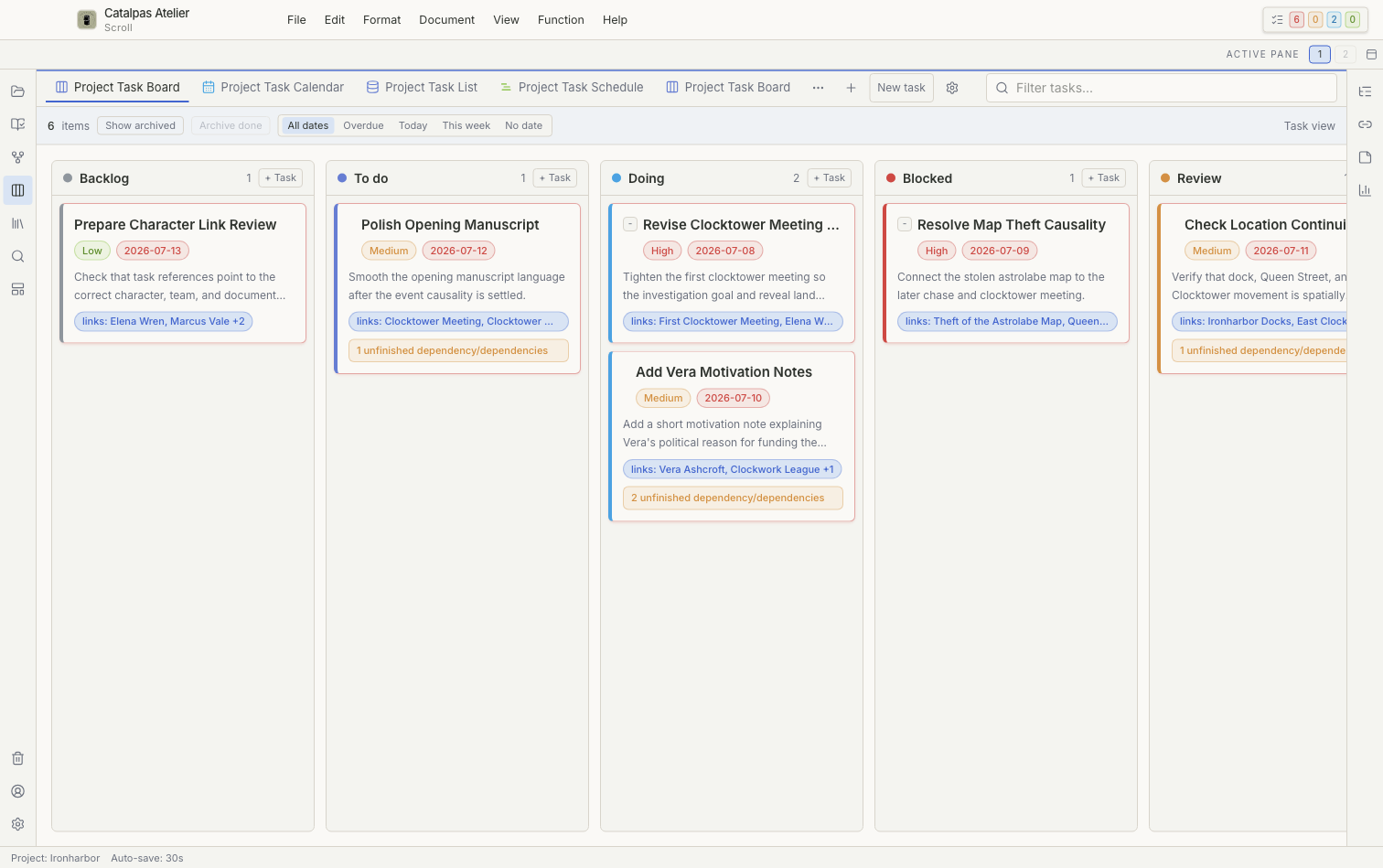
3. Create Project Task Board
- Open Tasks and duplicate or create a Project Task Board named
Draft Progress. - Group columns by Status, such as Backlog, Doing, Review, and Done.
- Set a reasonable WIP limit for Doing.
- Add swimlanes for a tag or stage only when they make the board clearer.
4. Check Project Task Calendar and Schedule
Use Project Task Calendar to find crowded dates and tasks without due dates. In Project Task Schedule, expand the parent-child hierarchy on the Gantt-style timeline and check milestones, durations, and dependency order. Changing a date updates the corresponding task; confirm the selection count before rescheduling several tasks.
5. Update progress from prose statistics
At the end of each writing period:
- Save the prose.
- Record the current word or character count.
- Update task Status.
- Add one note about a blocker or next action.
- Move a task to Done only after it meets the completion criteria.
The Stats panel describes writing volume, not the page count after Scribe typesetting. Character count is often more useful for languages that do not separate words with spaces.
6. Review each week
- Archive completed tasks that no longer need to remain visible.
- Split a stalled task into smaller actions or return it to Backlog.
- Remove dependency loops.
- Compare planned and completed work, then adjust next week's capacity.
- Confirm that the entire Project has a current backup.
Task dates do not create operating-system reminders after Scroll closes. If you need notifications, use a separate reminder tool and retain the matching task in Scroll.
What you learned
You turned a general writing goal into local tasks that can be completed and reviewed, and you can now examine progress by status, date, hierarchy, and timeline.