Timeline, Gantt, and Subway
Timeline, Gantt, and Subway all use event dates, but each answers a different planning question.
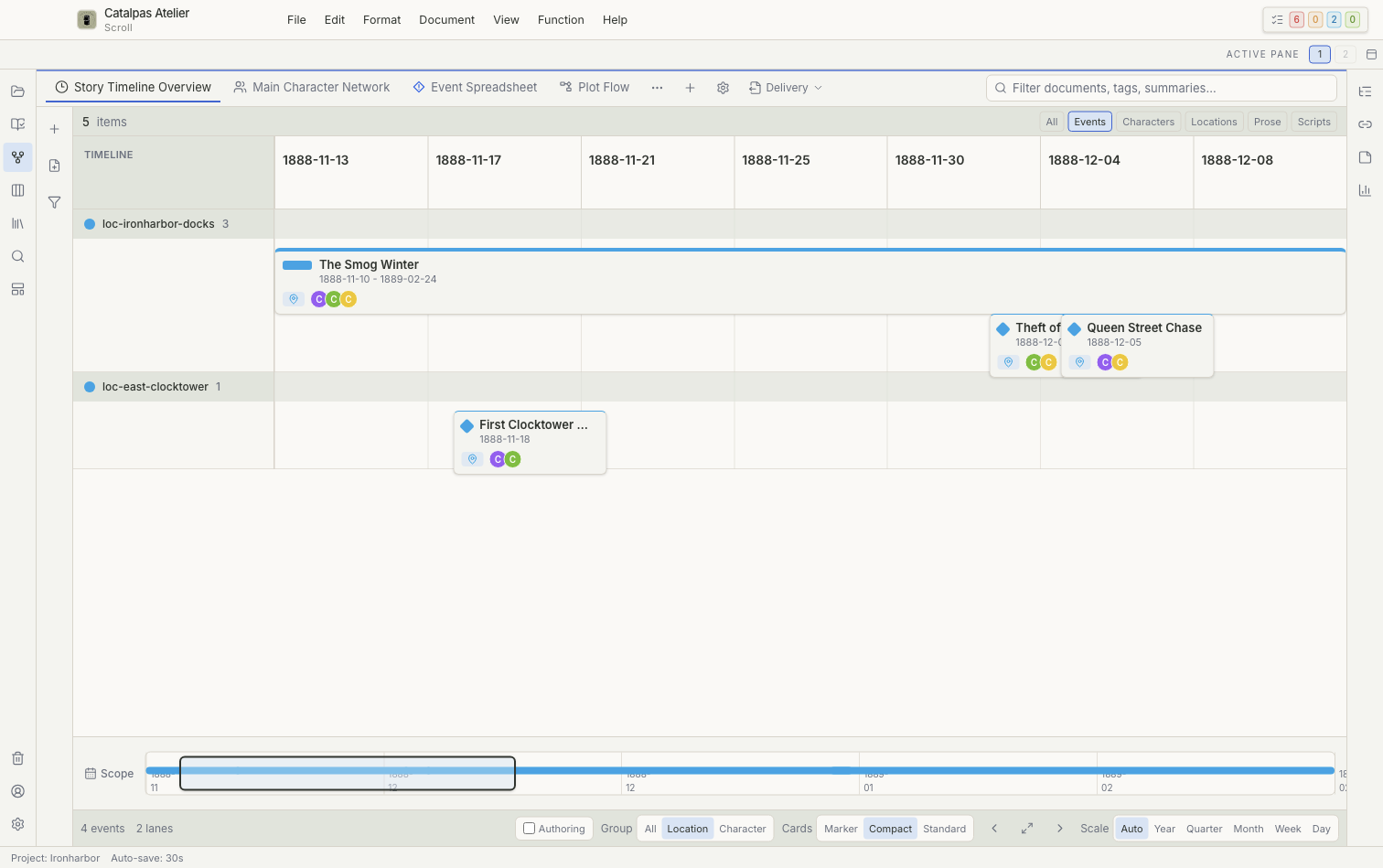
Timeline
Timeline is useful for checking event order, overlap, and the overall story range.
- The scope defines the full range the view can display.
- Focus start and Focus end define the interval currently emphasized.
- The scale can be Auto, Year, Quarter, Month, Week, or Day.
- Events can be grouped by location or character.
- Cards can use Marker, Compact, or Standard display.
With Timeline authoring enabled, you can create an event at a date, drag out an event range, create a related event, or move an event while preserving its duration. The normal selection state is primarily for browsing and opening records.
Gantt
Gantt displays duration from start and end dates and uses Parent relationships to build an event hierarchy. Lanes can be organized by Hierarchy, Category, or Status.
Authoring actions can create an event, child event, sibling event, or linked manuscript scene. Before moving an event, decide whether its children and duration should move with it.
Subway
Subway displays characters as lines and their shared events as stations. It is useful for finding where character arcs intersect.
Subway needs both participants and dates. It is currently intended mainly for viewing and opening events rather than editing its lines directly.
If the view is empty
Confirm that events have valid dates. Subway also requires Participants. Then check the saved view's filters, scope, Focus start, Focus end, and grouping.